What Is a Trading HUD? The Trader's Heads-Up Display Explained
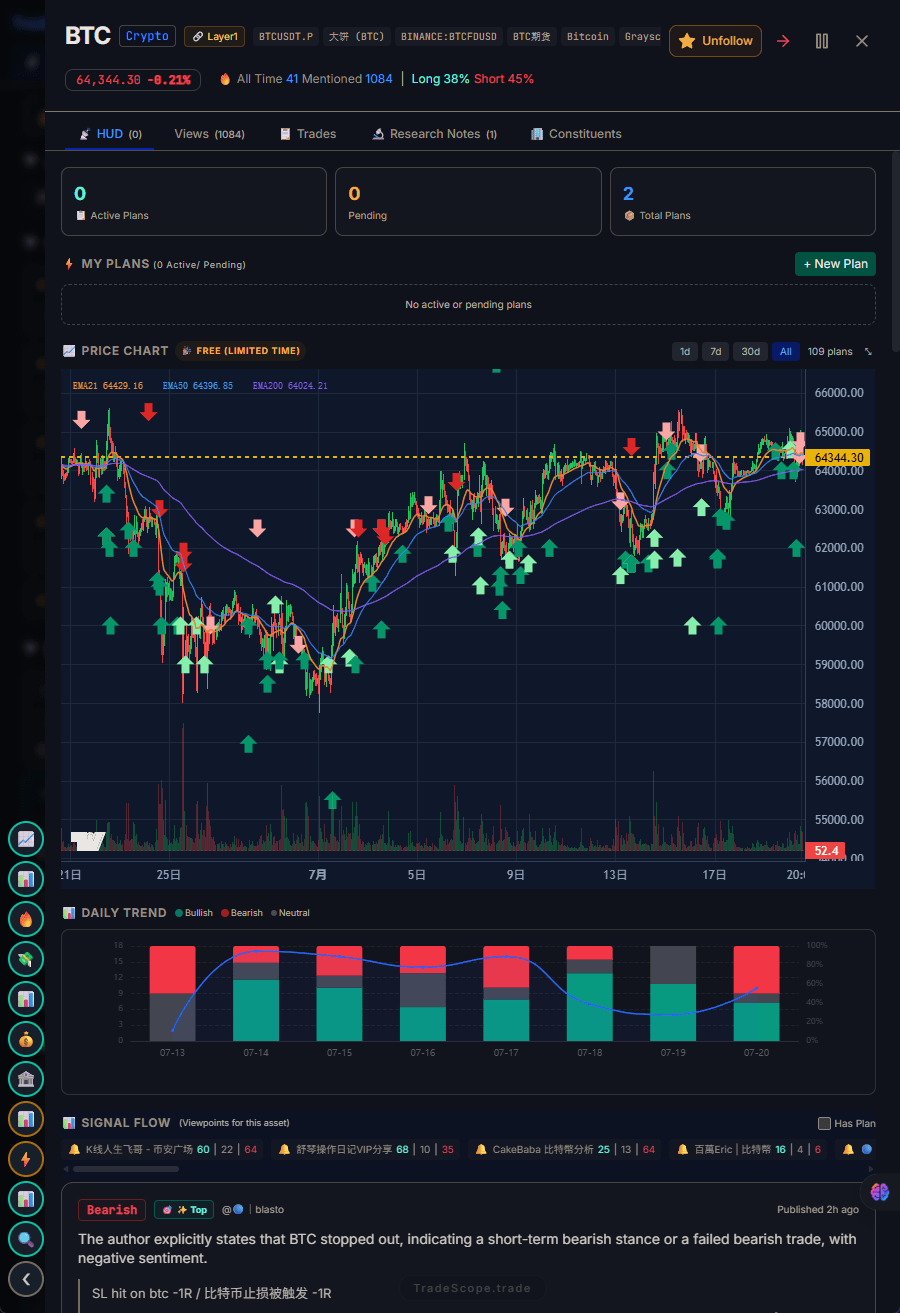
The TradeScope HUD: trading plan, sentiment signals, and trader reviews — all on one asset page.
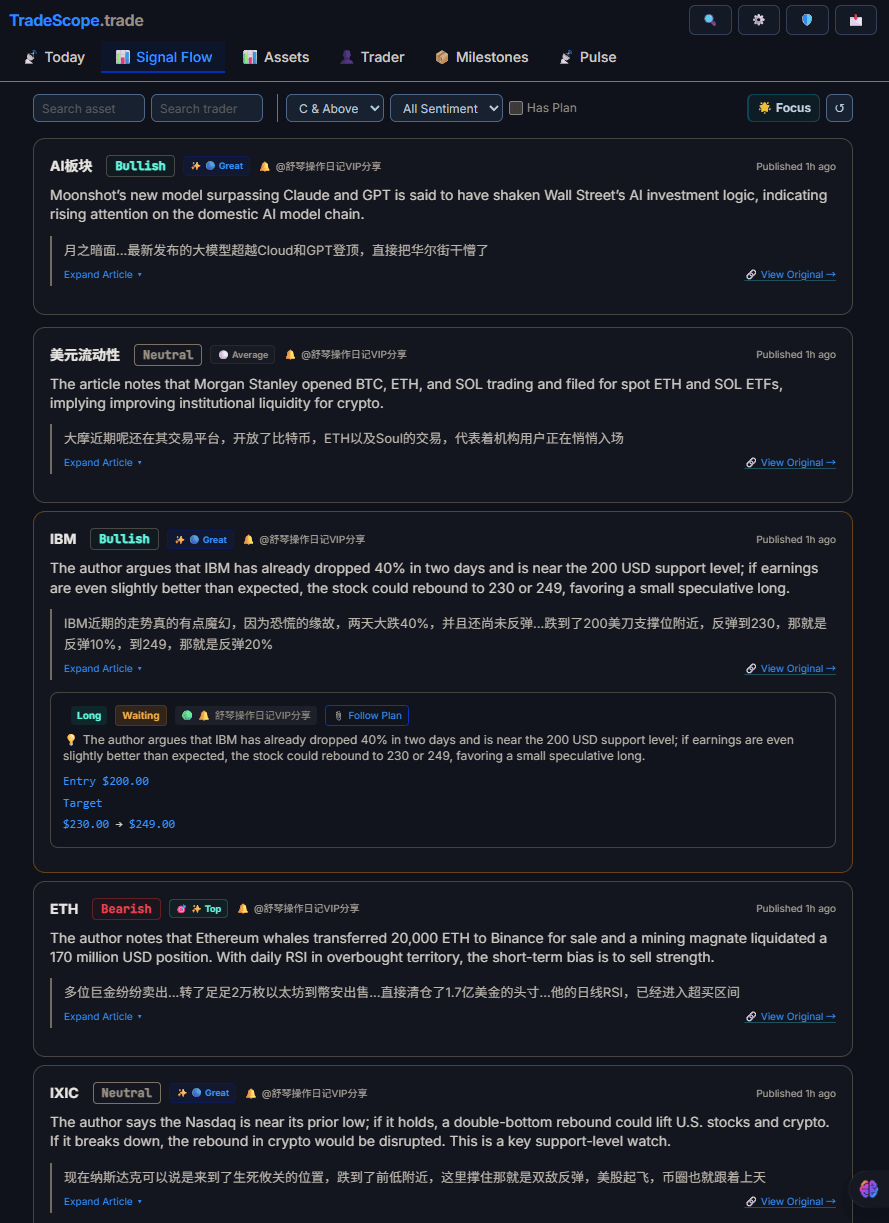
The Pulse feed surfaces real-time market signals so you never miss a shift in sentiment.
Every trader knows the feeling: too many tabs, too many tools, too much noise.
You have TradingView for charts, CoinGlass for liquidation data, Twitter for trader opinions, a notes app for your journal, and Discord for alpha. By the time you check everything, the move has already happened. This fragmentation isn't just inconvenient — it's costing you money. Each tab switch breaks your focus, and each disconnected tool introduces friction between the moment you spot an opportunity and the moment you act on it.
A Trading HUD (Heads-Up Display) solves this. It brings everything you need to make a trade decision — your plan, market sentiment, trader views, and real-time signals — into one unified interface. Just like a pilot sees altitude, speed, and navigation on a single display without looking down at individual instruments, a Trading HUD puts your critical trading data right in front of you. No tab switching. No context loss. No missed signals because you were checking the wrong screen.
In this guide, you'll learn what a Trading HUD is, how it differs from traditional trading tools, the four panels that make up a complete HUD, and why it's becoming essential for modern traders.
1. What Is a Trading HUD?
A Trading HUD (Heads-Up Display) is a unified dashboard that aggregates your entire trading workflow into a single view. The term comes directly from aviation — fighter pilots use a HUD to see altitude, speed, targeting, and navigation data projected onto the canopy in front of them. They never look down at individual gauges. Everything they need is already in their line of sight.
A Trading HUD applies the same principle to trading. Instead of switching between five different platforms to research, plan, execute, and review a trade, it brings those functions together. Everything you need — your entry criteria, the current market mood, what other traders are saying, and any unusual activity — appears in one place.
Think about your current workflow. When you see a potential setup, how many steps does it take before you can evaluate it? If you're like most traders, it goes something like this:
- Spot a move on TradingView
- Switch to CoinGlass or Santiment to check sentiment
- Open Twitter to see what traders are saying about it
- Check your journal or notes app to see if you've traded this asset before
- Go back to your exchange to execute
Each step adds a delay. Each delay costs you an edge. A Trading HUD collapses all five steps into one screen.
2. The Four Panels of a Trading HUD
A complete Trading HUD has four essential panels. Each solves a specific problem that every trader faces, regardless of whether they trade crypto, stocks, forex, or futures:
Panel 1: Trading Plan & Journal 📋
This is where you define your strategy before you enter a trade and review it after you close. The key word is before — most traders decide on their entry while looking at a chart, then rationalize afterward. A Trading Plan panel forces you to set your rules in advance.
- Pre-trade checklist: Define entry criteria, stop-loss, take-profit, and position size before you see a signal
- Post-trade review: Log what happened, whether you followed the plan, and what to adjust
- Pattern tracking: Review 20+ trades to find what's actually working — not what you think is working
Many traders use dedicated tools like Tradervue or Edgewonk for this. The problem? Those tools live in a separate tab from your charts and sentiment data. A HUD brings your journal into the same view as everything else, so you actually see your plan before you trade. Read more in our step-by-step guide to making a trading plan.
Panel 2: ViewPoint Radar 📡
No trader operates in a vacuum. You follow analysts on Twitter, subscribe to newsletters, and participate in trading communities. The challenge isn't access to opinions — it's filtering them.
- Aggregated feeds: See what top traders are saying about specific assets, consolidated from multiple sources
- Consensus spotting: When multiple independent traders flag the same asset, it's worth paying attention
- Divergence detection: When price action disagrees with trader sentiment, there's often an opportunity
This replaces the manual process of scrolling Twitter, checking Discord channels, and reading newsletters separately. For a deeper breakdown, see our guide on how to follow traders without information overload.
Panel 3: Sentiment Dashboard 📊
Market sentiment is one of the most powerful indicators — but only if you can read it in context. A Sentiment Dashboard shows the emotional state of the market at a glance:
- Bull/Bear ratio: What proportion of traders are bullish vs bearish on each asset
- Sentiment divergence: When price moves in one direction but sentiment moves in the opposite — a classic contrarian setup
- Emotional extremes: Fear and greed levels, social volume spikes, unusual messaging patterns
The key insight: sentiment is most useful when compared alongside your trading plan and current price action. A bullish sentiment reading means one thing when your plan says "look for longs" and something completely different when your plan says "wait for a pullback." Without a HUD, you're holding this context in your head. With a HUD, it's on the same screen.
Learn more about interpreting these signals in our trader sentiment analysis guide and sentiment divergence strategy.
Panel 4: Pulse — Hot Signals 🔥
The market moves fast, and the best opportunities often come with little warning. The Pulse panel surfaces real-time activity that deserves attention:
- Unusual volume: Assets showing significantly higher trading volume than their average
- Sudden sentiment shifts: Assets where the bull/bear ratio has changed dramatically in a short period
- Cross-community discussion: Assets being mentioned across multiple trader communities simultaneously
Instead of scanning 10 different feeds for breakout signals, Pulse consolidates them into a single sorted list, so you can focus your attention on what matters right now.
3. Trading HUD vs Traditional Trading Tools
The fundamental difference between a Trading HUD and the traditional approach is integration over aggregation. Aggregation means collecting data in one place. Integration means those data sources are connected — a change in one panel affects what you see in another.
| Function | Traditional Approach | Trading HUD |
|---|---|---|
| Trading journal | Notes app / Tradervue / Edgewonk | Built-in, linked to each asset |
| Sentiment data | Santiment / CoinGlass / TheTIE | Built-in, updated in real-time |
| Trader views | Twitter / Discord / Telegram (manual) | Aggregated, source-tagged feed |
| Signal detection | TradingView alerts / manual scanning | Automated, ranked by relevance |
| Tabs required | 4-8 open simultaneously | 1 |
| Setup time per session | 5-10 minutes opening tools | Instant |
| Context retention | In your head (lost on tab switch) | On screen (always visible) |
Each traditional tool does one thing well — but the cost is context switching. Every time you switch tabs to check sentiment, look at your journal, or see what a trader is saying, you break your focus. Research suggests it takes up to 23 minutes to regain deep focus after a distraction. For a day trader making 5-10 decisions per session, that context-switching tax adds up fast.
4. Who Needs a Trading HUD?
A Trading HUD isn't for everyone. Here's how to tell if you're the right fit:
You're a good candidate if:
- You regularly have 4+ tabs open during your trading session
- You've missed a trade because you were checking something in another tool
- You use a journal but rarely look at it before you trade
- You check sentiment after you enter, not before
- You follow multiple analysts or trading communities
You might not need one if:
- You trade one asset on one timeframe with one strategy (and it works consistently)
- Your entire workflow fits in one tool already
- You're not actively looking to improve your process
For most active traders — especially those trading multiple assets or incorporating sentiment into their decisions — a HUD isn't a luxury. It's a structural solution to a structural problem: information fragmentation.
5. Why a Trading HUD Matters More in 2026
The concept of a unified trading interface isn't new. But three converging trends make it significantly more relevant in 2026 than it was even two years ago:
Information overload has crossed a threshold
Crypto alone now spans 15,000+ tracked assets across multiple blockchains. Between Twitter, Discord, Telegram, newsletters, and dedicated analysis platforms, the average retail trader receives more data in a single session than a professional desk trader did a decade ago. The bottleneck has shifted from access to data to filtering and acting on data. A Trading HUD doesn't add more information — it organizes what you already have.
Sentiment has become a standard input
In 2024, sentiment analysis was still niche — something quant traders and crypto natives used. By 2026, it's mainstream. Retail traders across stocks, forex, and crypto regularly check bull/bear ratios and social volume as part of their process. But reading sentiment without a HUD forces you to hold it in memory while you check your charts, your journal, and your order book. A HUD makes sentiment a persistent part of your workflow rather than a separate step you might skip.
Tool fragmentation has reached a breaking point
The number of specialized trading tools has exploded. There are dedicated platforms for journaling (Tradervue, Edgewonk), sentiment (Santiment, LunarCrush, TheTIE), derivatives data (CoinGlass, Coinglass), community intelligence (etoro, LunarCrush), and charting (TradingView). Each is excellent at its specific function. But together, they create a workflow that requires more management than the actual trading. A HUD is the response to tool bloat — a way to keep using the data you need without managing the tools themselves.
For a broader perspective on how different types of traders navigate this landscape, see our comparison of crypto vs stock vs forex trader mindsets.
6. TradeScope: The HUD for Traders
TradeScope was built from the ground up as a Trading HUD. Every feature is designed around the four-panel structure — not bolted on as an afterthought.
- Trade Plan: A full trading journal that links plans directly to assets, not dates. When you look at an asset, you see your past plans and notes for that specific trade — not a generic timeline.
- ViewPoint Radar: Aggregated trader views from 100+ sources, tagged by asset and sentiment direction. You can see at a glance who's bullish, who's bearish, and what they're watching.
- Sentiment Dashboard: Real-time bull/bear ratios, divergence alerts, and emotional extreme detection across crypto, stock, and forex markets.
- Pulse: Hot signals surfaced from volume anomalies, sentiment spikes, and cross-community discussion patterns.
What distinguishes TradeScope from traditional tools is that these panels aren't separate products. They're layers of a single interface. When you check sentiment on an asset, your trading plan for that asset is right next to it. When you see a hot signal on Pulse, you can immediately check whether your journal shows a history of trading that setup successfully.
The result: fewer tools, fewer tabs, fewer distractions. More time spent actually trading.
Ready to try it? Get started free — no credit card required.