10 Best Trading Dashboard Features Every Trader Should Look For
Published June 23, 2026 · 8 min read
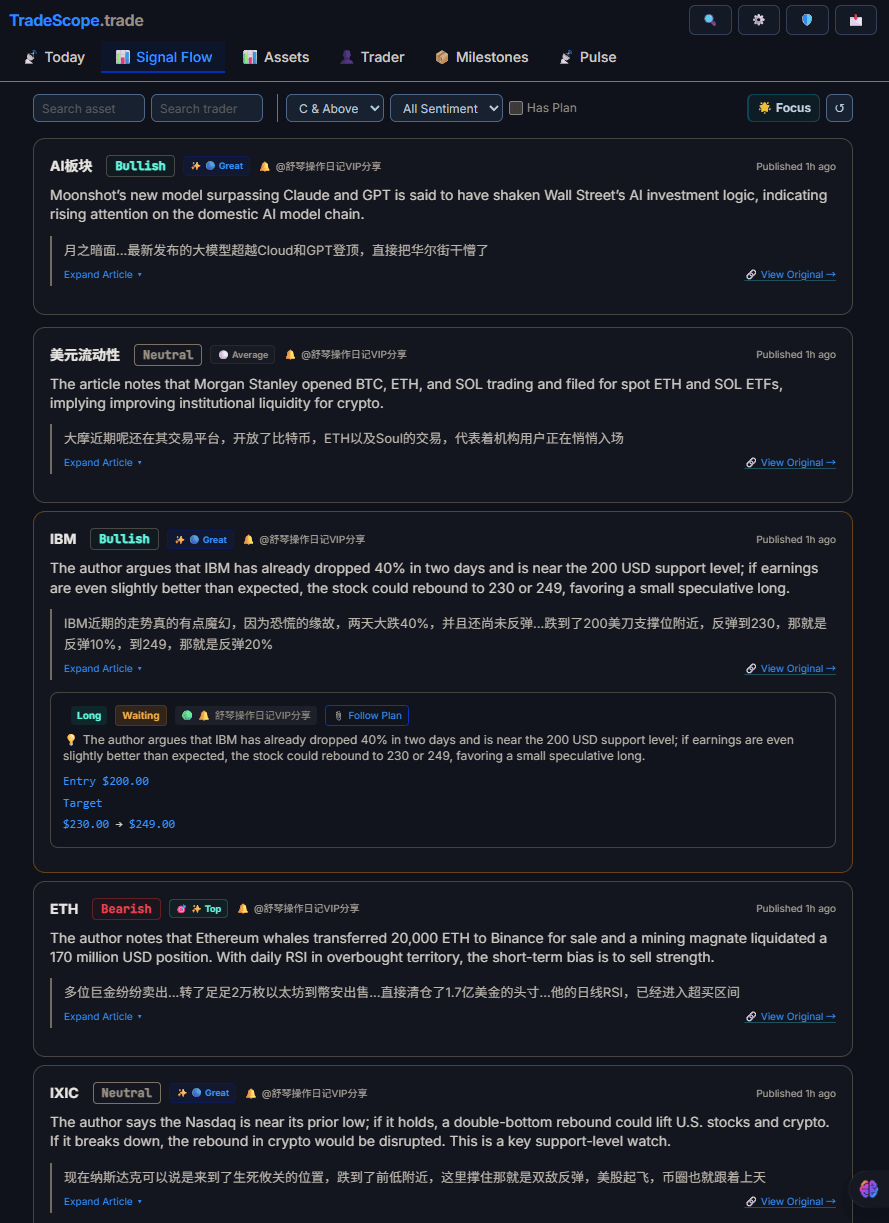
Real-time signal feeds help you spot opportunities as they emerge.
Most trading dashboards promise to "organize your trading life." Few actually deliver. The problem isn't a lack of features — it's too many features that do the wrong things. After analyzing dozens of trading tools and talking to hundreds of traders, the features that matter cluster around a surprisingly small set of principles.
Here are the 10 features that separate a dashboard worth opening every day from one that gathers digital dust.
1. Asset-Linked Journal
The single most impactful feature a trading dashboard can have is a journal that links directly to individual assets. Traditional trade logs organize everything by date — which forces you to scroll through days of entries to find what you wrote about Bitcoin last Tuesday. An asset-linked journal lets you pull up everything you've ever recorded about ETH, AAPL, or EUR/USD in one view.
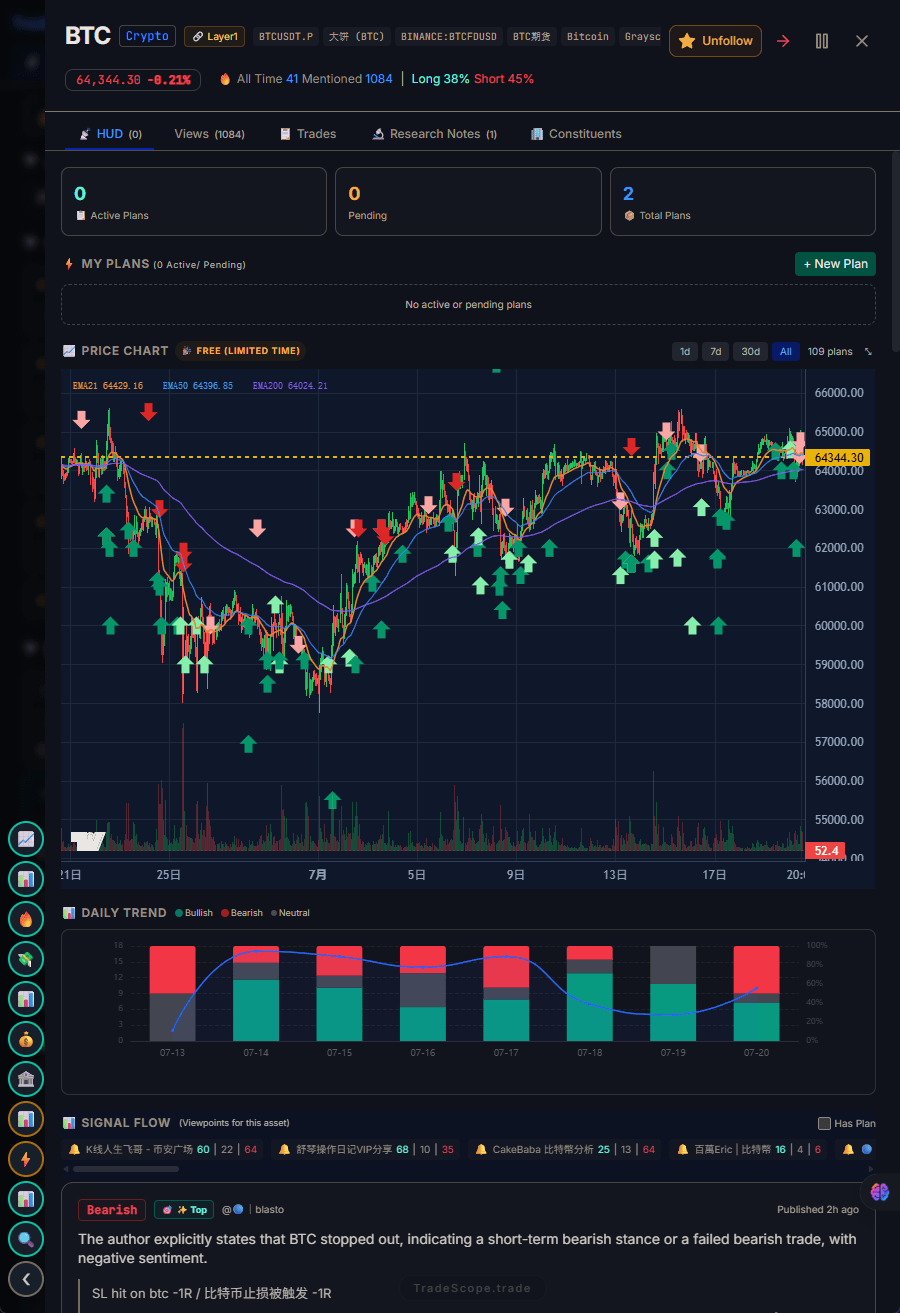
A trading HUD puts your plan, sentiment data, and trader reviews on every asset page.
This matters because trading decisions are asset-specific. When you're deciding whether to enter a BTC position, you want to see your previous notes on BTC — not a chronological dump of everything you've logged. It's the difference between a filing cabinet organized by date and one organized by topic.
2. Real-Time Sentiment Gauge
Market sentiment moves faster than price. A sentiment gauge that updates in real time — aggregating social media mentions, fear/greed indices, and community mood — gives you a second dimension beyond price charts. The best implementations don't just show "bullish" or "bearish" but give you a gradient: how strongly the market feels, and how quickly that feeling is shifting.
The key is that sentiment should be actionable, not just decorative. A number without context is noise. A number with historical comparison is insight.
3. Aggregated Trader Views
Knowing what other traders think — not just what algorithms are doing — is gold. Aggregated trader views collect opinions from verified traders and present them in a single feed. The trick is quality control: any system that lets anonymous accounts post without verification is just Twitter with extra steps.
The best trader views platforms filter for credibility. They weight opinions by track record, show you which assets specific traders specialize in, and let you follow the ones whose thinking resonates with your own strategy.
4. Hot Signal Detection
Hot signals are the events and anomalies that deserve your attention right now: unusual volume spikes, sudden sentiment shifts, whale movements, or breaking news that affects your watchlist. A good dashboard doesn't just list these — it ranks them by relevance to your specific positions and watchlist.
The difference between a useful signal system and an annoying notification firehose is personalization. The best tools learn what you care about and surface only what's relevant to your trading plan.
5. Multi-Market Coverage
Modern traders don't stick to one market. You might hold crypto, trade a few FX pairs, and have positions in equities. A dashboard that covers multiple markets in a single view saves you from tab-switching and context-switching — both of which degrade decision quality.
Multi-market coverage also enables cross-market correlation insights. When crypto dumps and the DXY spikes, you want to see both in the same place, not in two different apps.
6. Intentional Design Restraint
This isn't a traditional "feature" — it's the absence of a bad one. The best trading dashboards resist the urge to show everything. Every extra chart, widget, and metric on screen competes for your attention during the moments when focus matters most.
Look for dashboards that make deliberate choices about what not to show. A clean interface with fewer, better tools will serve you better than a Swiss Army knife that takes 15 seconds to find the right blade.
7. Free Tier That Isn't Useless
Most "free" trading tools give you just enough to get frustrated, then hit you with a paywall. A genuinely useful free tier lets you do real work: journal trades, see sentiment, track your watchlist. The free tier should be good enough that you'd recommend it to a friend — even if they never upgrade.
This feature matters because your dashboard should grow with you. If it's crippled at the free level, you'll never build the habit of using it daily.
8. Performance Analytics
A dashboard should tell you how you're doing — not just show you what you did. Performance analytics that track your win rate, average hold time, profit factor, and behavioral patterns give you the feedback loop that makes trading a skill rather than gambling.
The best analytics go deeper than surface metrics. They might show you that you perform better on mornings, or that you consistently hold losers too long, or that your best trades share a common entry pattern. That's the kind of insight that compounds over time.
9. Cross-Device Sync
You'll check your dashboard on your phone at lunch, on your desktop during market hours, and on a tablet while relaxing at night. Every interaction needs to be available everywhere instantly. No manual exports, no "this feature is desktop only," no data that doesn't transfer.
Cross-device sync also means your notes and journal entries need to be available on whatever device you're using. Writing a note on desktop and reading it on mobile should just work.
10. Tool Integration
No trading dashboard exists in isolation. You use TradingView for charts, maybe a separate portfolio tracker, possibly a signals group. The best dashboards play well with your existing stack — connecting to exchanges, importing data from other tools, or at minimum providing clean export options.
The integration doesn't need to be complex. Sometimes all you need is the ability to import your trade history from an exchange or export your journal notes. The point is that the dashboard fits into your workflow, not that it replaces everything you already use.
The Bottom Line
You don't need a dashboard with 200 features. You need one that does 10 things well — the right 10 things. The features above aren't a wish list. They're a filter. If a trading dashboard doesn't have at least 7 of these, you'll probably abandon it within a month.
Most traders make the same mistake: they choose a dashboard based on what it could do, not what they'll actually use every day. A feature-rich tool you open once a week is less valuable than a simple tool you open before every trade. The features above were selected not for their technical impressiveness but for their daily utility — the things that make you want to open the dashboard and keep it open.
And here's the thing most feature comparison articles won't tell you: the best feature of any trading dashboard is the one that gets you to use it consistently. A beautifully designed journal you actually fill in beats a 50-metric analytics suite that sits gathering dust.
TradeScope was built around exactly these 10 principles. Asset-linked journaling, real-time sentiment, aggregated trader views, hot signal detection, multi-market coverage, intentional minimalism, a generous free tier, performance analytics, cross-device sync, and clean integration — all in a single HUD designed to be opened every day.