Why Every Trader Needs a Trading Dashboard: The Case for a Unified HUD
Walk into any trading floor — physical or virtual — and you'll see the same thing: multiple screens, each running a different tool. Charts on one. Order book on another. News feed on a third. Social sentiment on a fourth. A notebook for the journal.
It's accepted as normal. But is it optimal?
In this article, we make the case for why a unified trading dashboard — or more specifically, a Trading HUD — is becoming essential for modern traders. The argument isn't about convenience. It's about decision quality, speed, and consistency.
1. The Hidden Cost of Tool Fragmentation
Let's start with a thought experiment. Time yourself through your next trade decision:
- You see a potential setup on your chart. Time = 0s.
- You open a second tab to check sentiment. +5s.
- You open Twitter to see what traders are saying. +10s.
- You check your journal to see if you've traded this setup before. +10s.
- You return to your exchange to execute. +5s.
That's 30 seconds of context switching for a single decision. Across 10 trades a day, that's 5 minutes lost to tab management alone. But the real cost isn't time — it's attention fragmentation. Each switch resets your mental context. By the time you return to the original setup, the conviction or hesitation you felt is gone, replaced by the overhead of reorienting yourself.
A unified trading dashboard eliminates this friction. When your plan, sentiment data, and trader views are visible alongside your charts, you evaluate the trade in one continuous flow — not in fragmented bursts between tab switches.
2. What a Trading Dashboard Should Actually Do
Not all trading dashboards are created equal. Many are simply portals that display multiple data sources in one page — but without meaningful integration between them. A useful trading dashboard should meet three criteria:
Criterion 1: Information should be decision-ready
Data displayed without context is decoration. A sentiment reading of "65% bullish" means nothing on its own. But "65% bullish on BTC, compared to 42% last week, while price is down 3%" is decision-ready information. A good dashboard presents data with the context needed to act on it.
Criterion 2: Related data should be visually connected
When you look at a specific asset, you should see that asset's sentiment, trading plan history, and any relevant trader views — all on the same screen. If you have to click through tabs or filter by asset again, the connection is broken.
Criterion 3: Your workflow should flow naturally
The sequence of a trade — research → plan → execute → review — should map directly to how the dashboard is organized. If you have to re-learn your workflow to fit the tool, the tool is wrong, not you.
Most traditional trading dashboards fail on at least one of these criteria. They aggregate data without integrating it. A Trading HUD — which we define in detail in What Is a Trading HUD? — is designed specifically to meet all three.
3. Trading Dashboard vs Trading HUD
The terms "trading dashboard" and "trading HUD" are often used interchangeably, but they represent different philosophies:
| Dimension | Trading Dashboard | Trading HUD |
|---|---|---|
| Design origin | Business intelligence dashboards | Aviation heads-up displays |
| Primary goal | Show all data at once | Show the right data at the right time |
| Data relationship | Side-by-side, independent widgets | Connected, context-aware layers |
| Role in workflow | Reference tool (check periodically) | Decision environment (work inside it) |
| User experience | You manage the dashboard | The HUD manages to you |
The difference matters because it changes how you interact with the tool. A dashboard asks you to find the information you need within it. A HUD presents the information you need based on what you're doing. For active traders who make rapid decisions, the HUD model is significantly more effective.
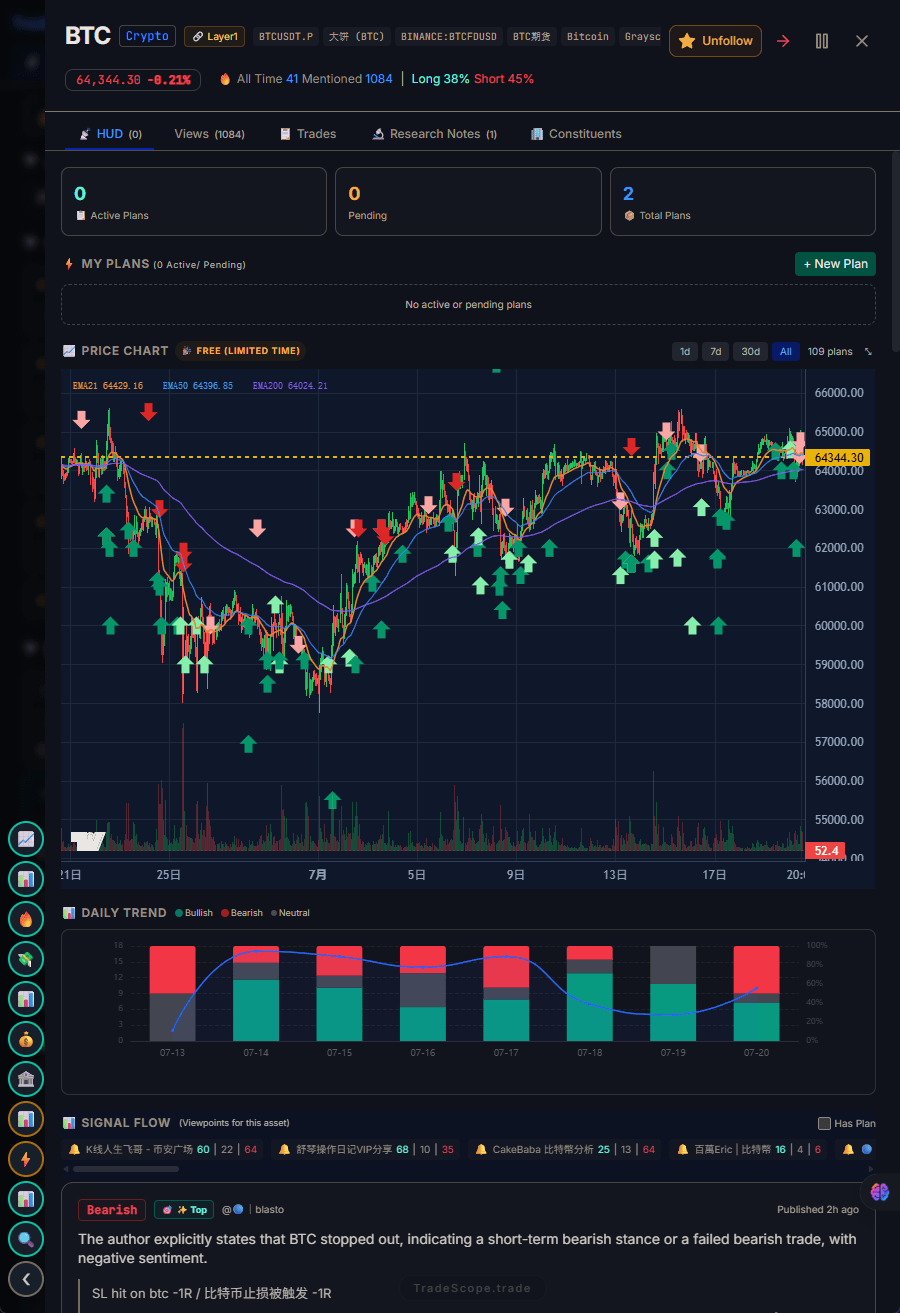
A trading dashboard gives you the full picture before you enter a trade.
4. Five Reasons You Need a Unified Trading View
If you're still managing multiple tools, here are five specific ways a unified trading dashboard (or HUD) directly impacts your trading:
Reason 1: You'll check sentiment before every trade
The single biggest behavioral change traders report after switching to a unified view is consistency. When sentiment is in the same screen as your chart and plan, you check it without thinking. When it's a separate tab, you skip it during fast markets. Consistency in checking relevant data is worth more than any single indicator.
Reason 2: Your plan becomes visible at decision time
The most common post-trade review note on TradeScope? "I saw the signal but didn't take it." The plan existed — it just wasn't visible when needed. A unified view solves this by keeping your plan in your field of view throughout the decision process. For more on this, see our guide to building a trading plan.
Reason 3: You'll catch sentiment divergences earlier
Sentiment divergence — when price moves one way and crowd sentiment moves the other — is one of the most reliable setups in trading. But spotting it requires seeing price and sentiment data simultaneously. In a fragmented workflow, you might not notice until the divergence has already resolved. In a unified view, it's immediately visible. Our guide on sentiment divergence strategy covers this in detail.
Reason 4: Tool cost adds up
A typical trading tool stack: TradingView ($50/mo), CoinGlass ($30/mo), Tradervue ($30/mo), Santiment ($50/mo), and a news feed ($20/mo). That's $180/month for five tools that don't talk to each other. A unified HUD replaces most of these with a single subscription — while providing better integration.
Reason 5: Less mental overhead means better decisions
Every decision you make about which tool to open, which tab to check, and where to find the data for a specific asset is a decision that competes with your trading decisions. Reducing tool overhead frees mental bandwidth for what actually matters: reading the market and executing your strategy.
5. TradeScope: Built as a HUD, Not a Dashboard
TradeScope wasn't built by adding features to a charting tool or bolting sentiment onto a journal. It was designed from the ground up as a Trading HUD — a unified decision environment that integrates your plan, sentiment, trader views, and signals.
Here's what that means in practice:
- When you open an asset on TradeScope, you see its sentiment data, your past journal entries for that asset, and any relevant trader views — all in one view
- Your trading plan is linked to assets, not dates — so when you look at ETH, you see what you planned for ETH, not a chronological list of all your trades
- The ViewPoint Radar aggregates trader opinions from across your selected sources, tagged by asset and direction — so you can see at a glance who's bullish and who's bearish on what you're watching
- Pulse surfaces hot signals ranked by relevance, and you can drill into any signal to see the full context before deciding
The result is a single screen that replaces the 4-8 tabs most traders keep open. No context switching. No data living in silos. Just your trading environment, organized around your workflow.
Ready to try a trading HUD? Get started free on TradeScope.