Trading HUD vs Traditional Trading Tools: Why an All-in-One Platform Wins
As of 2026, the average active trader uses 3-5 separate tools to cover their basic workflow: a charting platform, a sentiment data provider, a journaling tool, a news feed, and a trade execution platform. Some use more. None of them talk to each other.
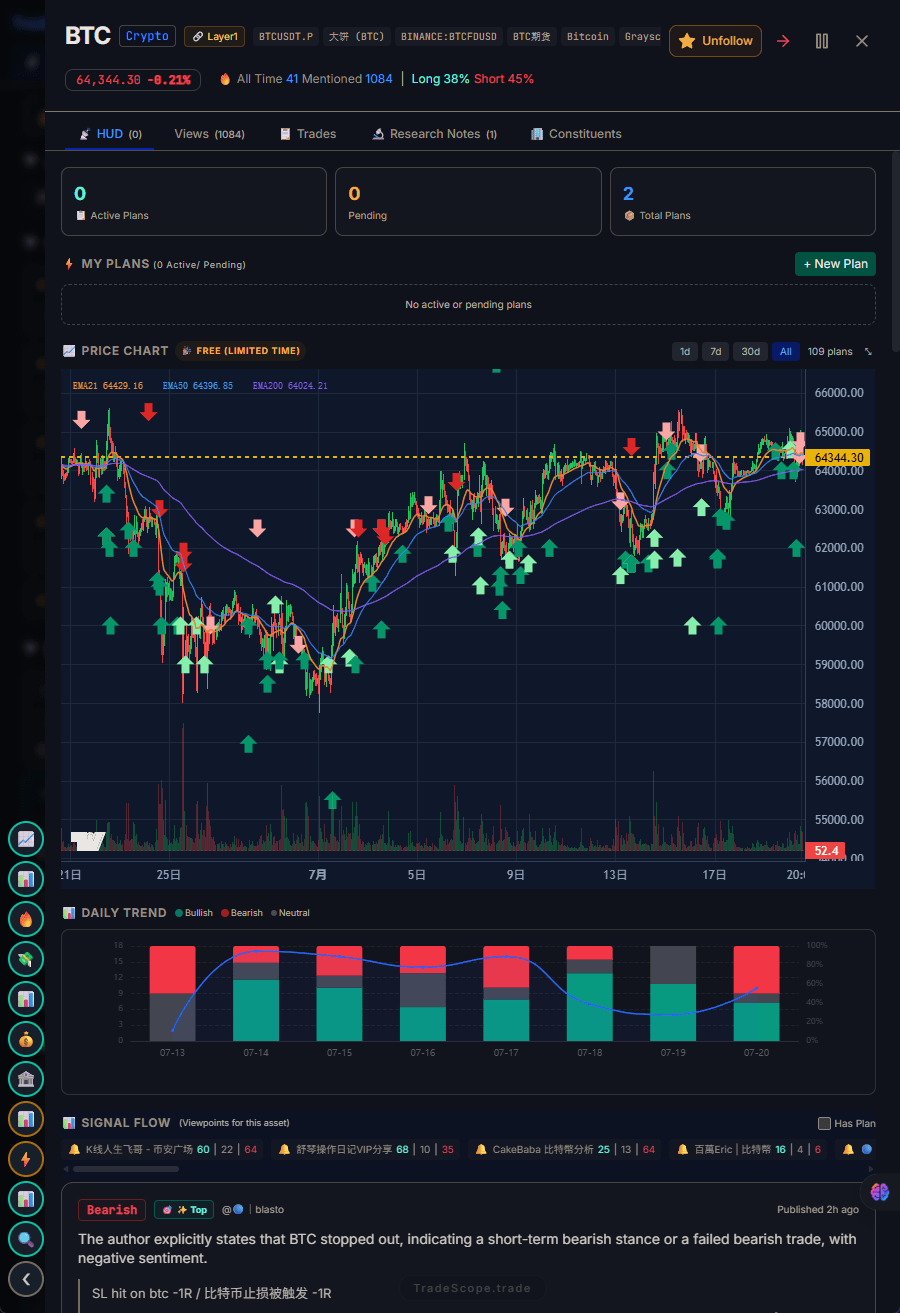
Unlike scattered tools, TradeScope consolidates everything into a single HUD.
But a new category of all-in-one trading platforms — specifically Trading HUDs — is challenging this fragmented model. Instead of asking you to manage five tools, a Trading HUD integrates everything into a single decision environment.
This article compares the two approaches head-to-head. No marketing fluff — just a structured comparison of how they perform across the dimensions that actually matter to your trading.
1. Head-to-Head Comparison
Let's start with a direct comparison across the tasks every trader performs daily:
| Task | Traditional Tools | Trading HUD |
|---|---|---|
| Check sentiment on an asset | Open Santiment/LunarCrush/CoinGlass in a new tab, search for the asset | Already visible on the asset view — zero navigation |
| Log a trade to your journal | Switch to Tradervue/Edgewonk/notes app, fill in fields manually | Log in the same interface — context is already there |
| Review your plan before trading | Open separate notes app or document | Plan is linked to the asset — visible at decision time |
| See what traders are saying | Scroll Twitter/Discord/Telegram manually | Aggregated feed tagged by asset and sentiment direction |
| Spot unusual activity | Cross-reference volume, sentiment, and mentions across 3+ tools | Pulse surfaces hot signals ranked by relevance |
| Review performance data | Export data from journal, combine with trade history manually | Built-in analytics across all your trades |
| Session startup time | 5-10 minutes opening and arranging tools | Open one page — ready in seconds |
The pattern is clear: traditional tools win on depth (each tool is optimized for its specific function), but they lose on integration. A Trading HUD makes the common tasks faster at the cost of some depth in individual features.
For most active traders, the trade-off is worth it — because the tasks you do most often (check sentiment, review plan, log trade) benefit most from integration, while the occasional deep-dive analysis still works fine with specialized tools.
2. The Context Switching Problem
The hidden tax of a fragmented tool stack is context switching. Every time you switch from one tool to another, your brain has to:
- Disengage from the current task
- Recall the context of the new task
- Reorient to the interface of the new tool
- Find the specific data you need
Each step takes 2-5 seconds. Across dozens of switches per trading session, that's 10-15 minutes of pure overhead. But the real damage is cognitive — you're trading in a state of constant partial attention rather than deep focus.
Research on task-switching (often cited in productivity literature, but directly applicable to trading) suggests that after a disruption, it takes 15-25 minutes to return to full cognitive focus. For a trader making rapid decisions, even a 5-second interruption can mean the difference between catching a move and missing it.
This is the core argument for an all-in-one trading platform: not that it has better data, but that it preserves your attention for the decisions that actually matter.
3. The Cost of a Fragmented Tool Stack
Let's put a number on the fragmentation problem. A common mid-tier trading setup:
| Tool | Monthly Cost | Purpose |
|---|---|---|
| TradingView Pro | $49 | Charting and technical analysis |
| CoinGlass/Cryptorank | $30-50 | Derivatives and market data |
| Tradervue/Edgewonk | $30 | Trading journal and performance analytics |
| Santiment/LunarCrush | $40-60 | Social sentiment and on-chain data |
| News/alpha feed | $20-50 | Breaking news and trader commentary |
| Total | $170-240/mo | $2,000-2,900/year |
That's $2,000-2,900 per year for tools that don't talk to each other. Compare this to a Trading HUD like TradeScope, which replaces most of these with a single subscription at a fraction of the cost.
But the financial cost is only part of the picture. The time cost of managing multiple tools — updates, new features to learn, logins to remember, data to export and merge — adds up to hours per month that could be spent actually trading or improving your strategy.
4. What Makes a Good All-in-One Trading Platform
Not all integrated trading platforms are created equal. If you're evaluating an all-in-one solution, here are the specific criteria that separate useful integration from superficial aggregation:
Asset-linked context
The hallmark of true integration is that data follows the asset, not the tool. When you look at ETH, your ETH sentiment, ETH journal entries, and ETH trader opinions should all appear automatically. If you have to search for each data source separately, it's not integration — it's tabs in disguise.
Workflow-native, not bolt-on
A good all-in-one platform is designed around the trading workflow: research → plan → execute → review. Features should be organized in the order you use them, not by data source. If the platform feels like five separate tools glued together with a unified login, it hasn't solved the fragmentation problem.
Real-time relevance
An integrated platform should surface what matters right now, not just display everything all the time. The value of integration is proportional to how well the tool filters noise — because having all data in one place is only useful if you can find what you need when you need it.
TradeScope was built with all three criteria in mind. The four-panel HUD structure — Trading Plan, ViewPoint Radar, Sentiment Dashboard, and Pulse — is designed so that each panel informs the others naturally, without you having to connect the dots manually.
5. When Fragmented Tools Still Make Sense
An all-in-one trading platform isn't the right answer for everyone. Here's when the traditional fragmented approach still wins:
When you need maximum depth in one area
If you're a dedicated chartist who lives in TradingView's Pine Script ecosystem, no HUD can match the depth of that specific tool. If your entire strategy depends on a specific indicator or custom script, stay with the specialized tool.
When you trade one asset with one strategy
If you trade one asset on one timeframe with a single strategy, you don't need a HUD. Your workflow is simple enough that tab switching doesn't cost you much. The integration benefits of a HUD scale with complexity — the more assets and strategies you manage, the more valuable integration becomes.
When you already have a system that works
If your current workflow produces consistent results and you're not feeling the friction, there's no urgent reason to change. A HUD is a solution to a specific problem: information fragmentation. If you don't have that problem, you don't need the solution.
6. The Verdict
Here's the honest take:
If you're using 1-2 tools and your trading process feels smooth, you probably don't need an all-in-one platform. Stick with what works.
If you're juggling 3+ tools, regularly check sentiment after you enter a trade (not before), and feel like you're managing tools instead of trading — an all-in-one Trading HUD will likely improve both your efficiency and your decision quality.
The difference between a Trading HUD and traditional tools isn't about which has better features. It's about which removes more friction from your actual workflow. For a growing number of traders, the answer is increasingly clear.
For a complete introduction to the Trading HUD concept, start with our guide: What Is a Trading HUD?