5 Signs Your Trading Setup Needs a HUD
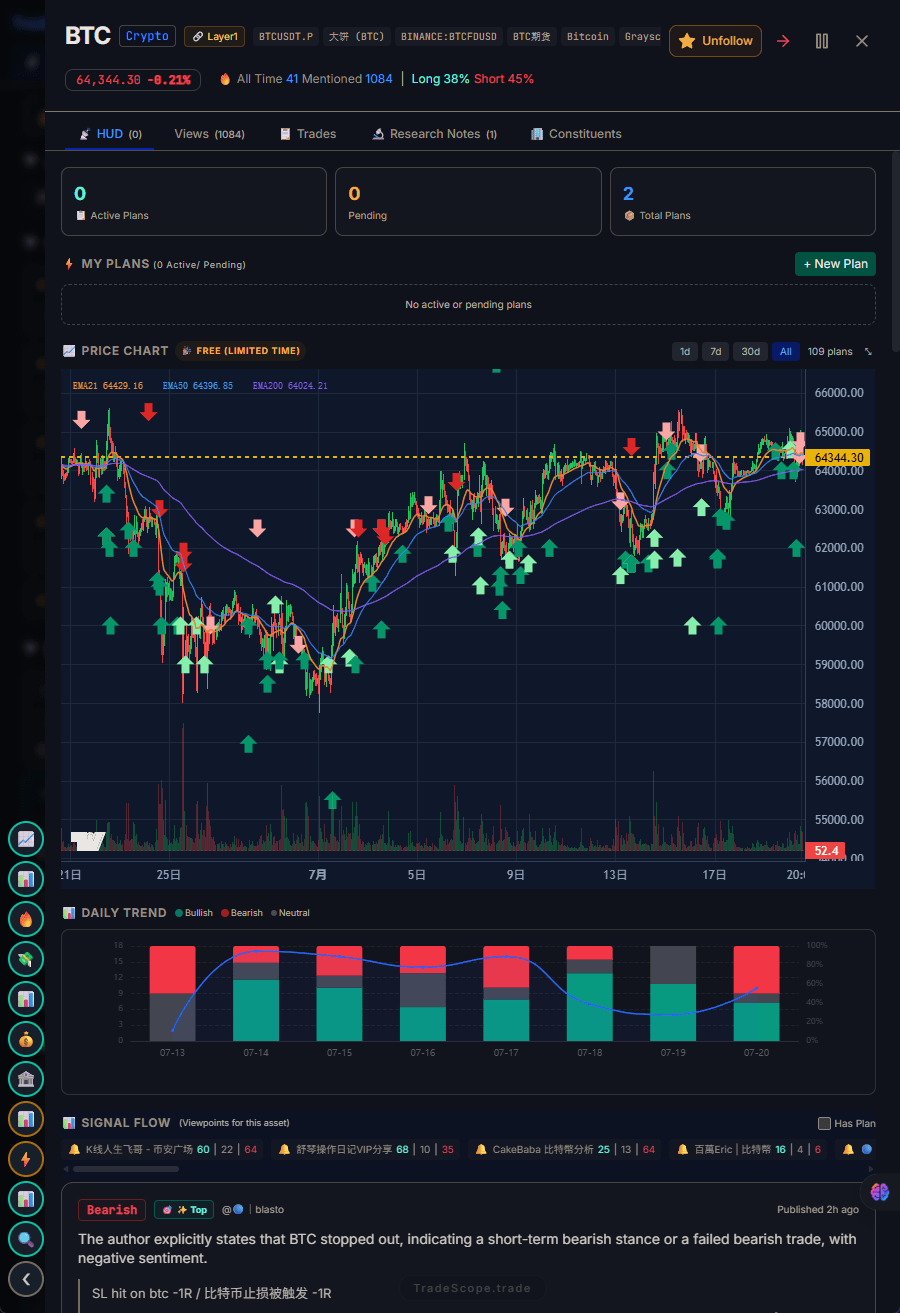
If you're juggling multiple tabs, a HUD brings everything together.
You don't realize your trading setup is broken — until you fix it.
Most traders accept the friction of a fragmented tool stack as normal. Multiple tabs, scattered data, context lost every time you switch screens. It's just "how trading works."
But there are specific, recognizable signs that your current setup is costing you money. Here are five of them — and what to do about each.
🚩 Sign 1: You Check Sentiment After You Enter, Not Before
Here's the tell: you see a breakout, enter the trade, then check sentiment to feel good about your decision. Sound familiar?
Post-entry sentiment checking is confirmation bias disguised as research. You're not using sentiment to make decisions — you're using it to validate decisions you've already made. And that destroys the value of sentiment data entirely.
Why it happens: Checking sentiment requires a separate tab, a separate login, or a separate tool. In the moment of decision, the friction is high enough that you skip pre-entry sentiment and just trade on price action.
How a HUD fixes it: When sentiment is in your main trading view — not a separate tab — you check it before entering because it's already there. This simple behavioral shift is the most common improvement traders report after switching to an integrated setup. For more on reading sentiment effectively, see Trader Sentiment: How to Read Market Mood.
🚩 Sign 2: You Have 4+ Tabs Open During Every Session
A quick test: look at your browser right now. Count the trading-related tabs. If it's four or more, you have a fragmentation problem.
It's not about screen space. Modern monitors can show multiple windows side by side. The problem is that each tool lives in its own silo. Your chart doesn't know what your sentiment tool is showing. Your journal doesn't connect to your trade history by asset. You're doing the integration work manually — in your head.
Why it happens: Each tool serves a real purpose. You wouldn't open it if it didn't. The problem is that no single tool covers all your needs, so you compensate by using many.
How a HUD fixes it: A Trading HUD integrates multiple data sources into one view. Trading Plan, sentiment, trader views, and hot signals live in the same interface. The four tabs become one. Learn more about how this works in What Is a Trading HUD?
🚩 Sign 3: You Have a Trading Journal You Rarely Read
Most traders start with good journaling habits. They log every trade, note their emotions, review their mistakes. Then they get busy, and the journal becomes a record of trades rather than a tool for improvement.
The real issue: even if your journal is well-maintained, do you read it before you trade? Or only after a loss?
Why it happens: Your journal is in a separate tool. When you're in your chart or exchange, the journal isn't visible. The mental cost of opening it just to check "have I traded this setup before?" is enough to skip it — until the loss is painful enough to force a review.
How a HUD fixes it: When your journal is asset-linked and lives in the same interface as your data, you see past entries naturally. Looking at ETH? Your past ETH trades and notes are right there. No extra click. No friction. For a guide on building an effective plan, see How to Make a Trading Plan in 2026.
🚩 Sign 4: You Missed a Trade Because You Were Checking Something Else
This is painful because you can't undo it. You spotted a setup, switched to check sentiment, switched again to confirm your thesis, and by the time you returned to execute — the move had already happened. Or the moment of conviction passed.
This isn't a discipline problem. It's a tool design problem. Your setup forces you to leave the execution context to gather information. Every switch creates a window of opportunity — not for you, but for the market to move without you.
Why it happens: The information you need to make a decision lives in different tools that require different clicks, different navigations, and different mental contexts to access.
How a HUD fixes it: By eliminating tab switching entirely. All decision-critical information is in one view. You see sentiment, your plan, and trader views alongside your charts — so you evaluate everything in one continuous flow.
🚩 Sign 5: You Spend More on Tools Than on Strategy
Look at your monthly trading tool subscriptions. Now look at what you spend on education, research, or strategy development. If tools cost more than strategy, your priorities are inverted.
A typical fragmented stack runs $170-240/month (TradingView + CoinGlass + Tradervue + Santiment + news feeds). That's $2,000-2,900/year for tools that don't work together. Compare that to a comprehensive educational course ($500-1,500 one-time), a good book collection ($100-200), or a strategy development service ($50-100/month).
Why it happens: As traders grow, they add tools incrementally. Each one seems necessary at the time. $30 here, $50 there — it doesn't feel like much until you add it up.
How a HUD fixes it: An integrated HUD replaces most of these tools with a single subscription. Instead of paying for data in one tool and journaling in another, you get them together. For a detailed cost comparison, see Trading HUD vs Traditional Trading Tools.
🔧 The Fix: One HUD Instead of Five Tools
If any of these signs resonate, the question isn't whether to change your setup — it's when. Each sign represents real costs: missed trades, skipped reviews, tool overhead that crowds out actual trading.
The fix isn't to add another tool. It's to consolidate what you already use into a unified Trading HUD. Not because the individual tools are bad (they're excellent at their specific functions), but because the cost of switching between them exceeds the value of their individual features.
TradeScope is designed as a Trading HUD — integrating your trading plan, sentiment data, trader views, and hot signals into a single view. Not as a replacement for your charts, but as the decision layer that connects everything else.